

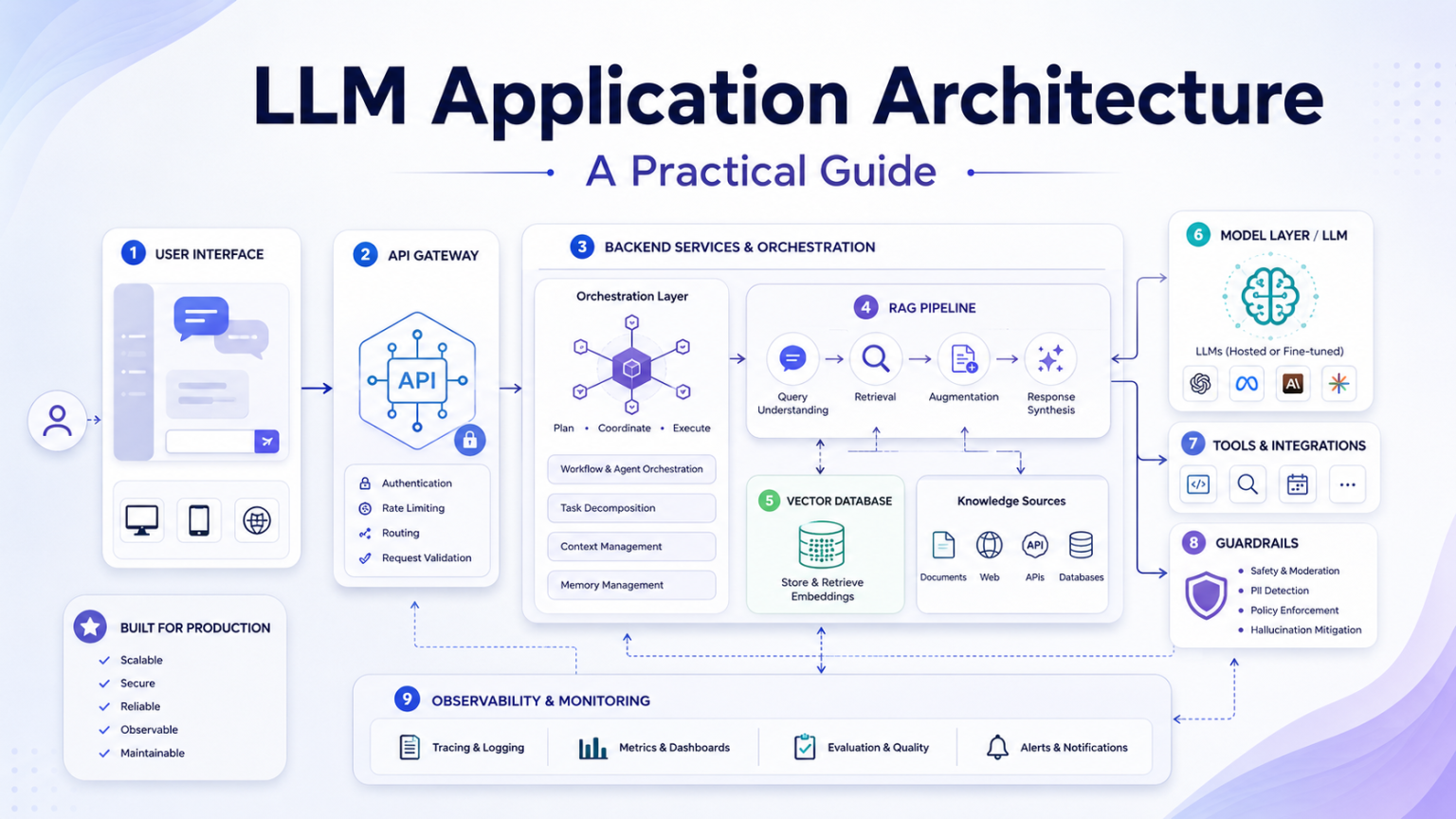
A production-grade LLM application is much more than a prompt sent to a model API. It is a complete software system designed to understand user intent, retrieve accurate context, interact with external tools, validate AI-generated responses, protect sensitive information, and continuously monitor application performance.
While a basic prototype may work with nothing more than user input, a prompt, and an LLM response, real-world production systems require authentication, context retrieval, prompt orchestration, tool integration, output validation, safety guardrails, observability, performance monitoring, and cost optimization.
This guide focuses on the surrounding application ecosystem that enables LLMs to operate securely, efficiently, and at scale in real-world environments.
What is LLM application architecture?
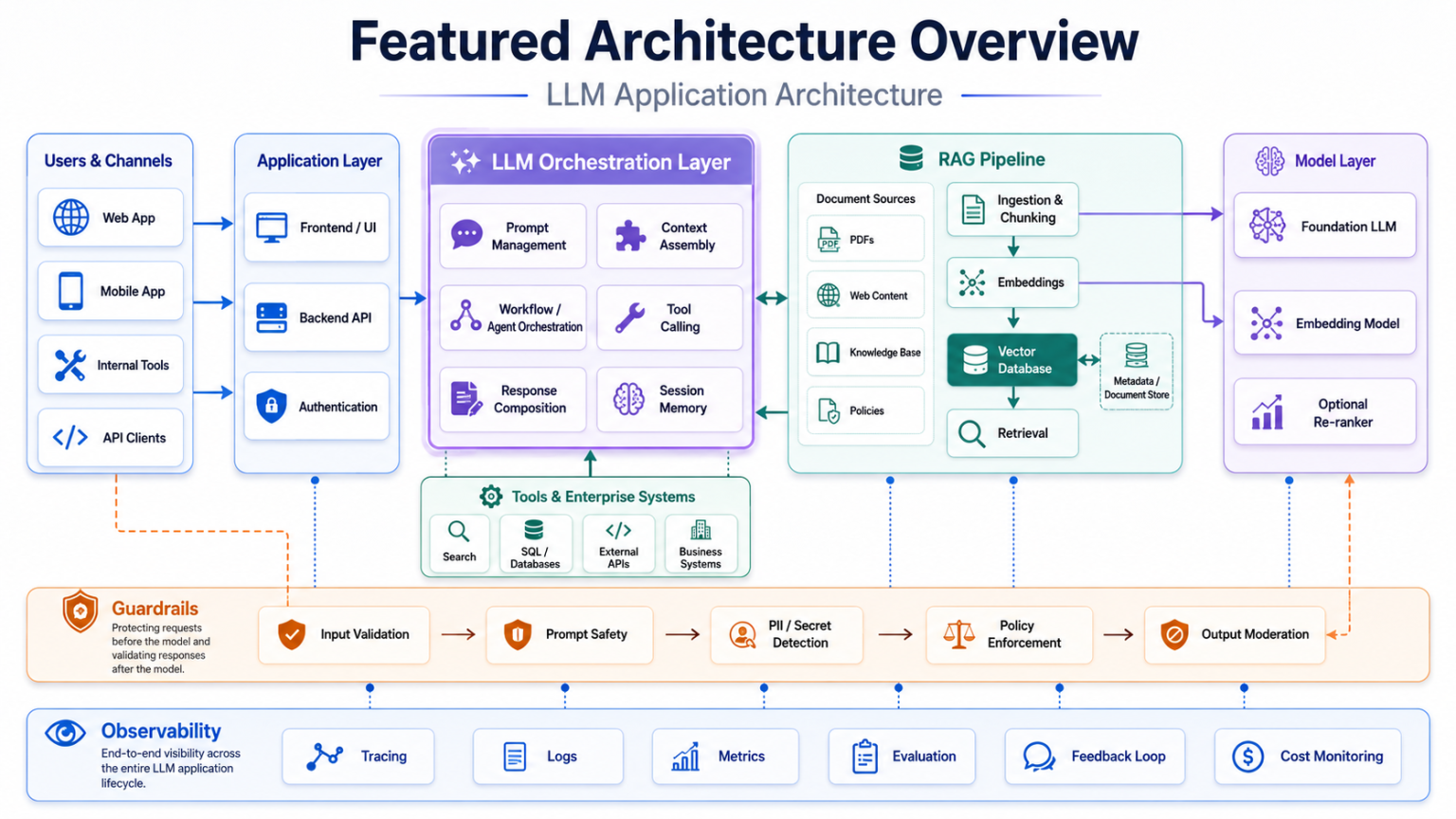
LLM Application Architecture refers to the overall design of a software system built around a Large Language Model. It defines how components process user requests, retrieve relevant information, interact with external services, generate AI responses, validate outputs, and monitor the complete application lifecycle.
This is different from LLM model architecture. Model architecture focuses on Transformer layers, attention mechanisms, tokenization, embeddings, and model parameters. Application architecture focuses on how software integrates with the model to deliver secure, reliable, and scalable AI-powered experiences.
- Authenticate and authorize the user before the AI workflow starts.
- Retrieve trusted context before generating the prompt.
- Manage prompts, tools, models, validation rules, and logs as versioned application assets.
- Monitor latency, accuracy, token usage, cost, and operational failures continuously.
Core layers of a production LLM application
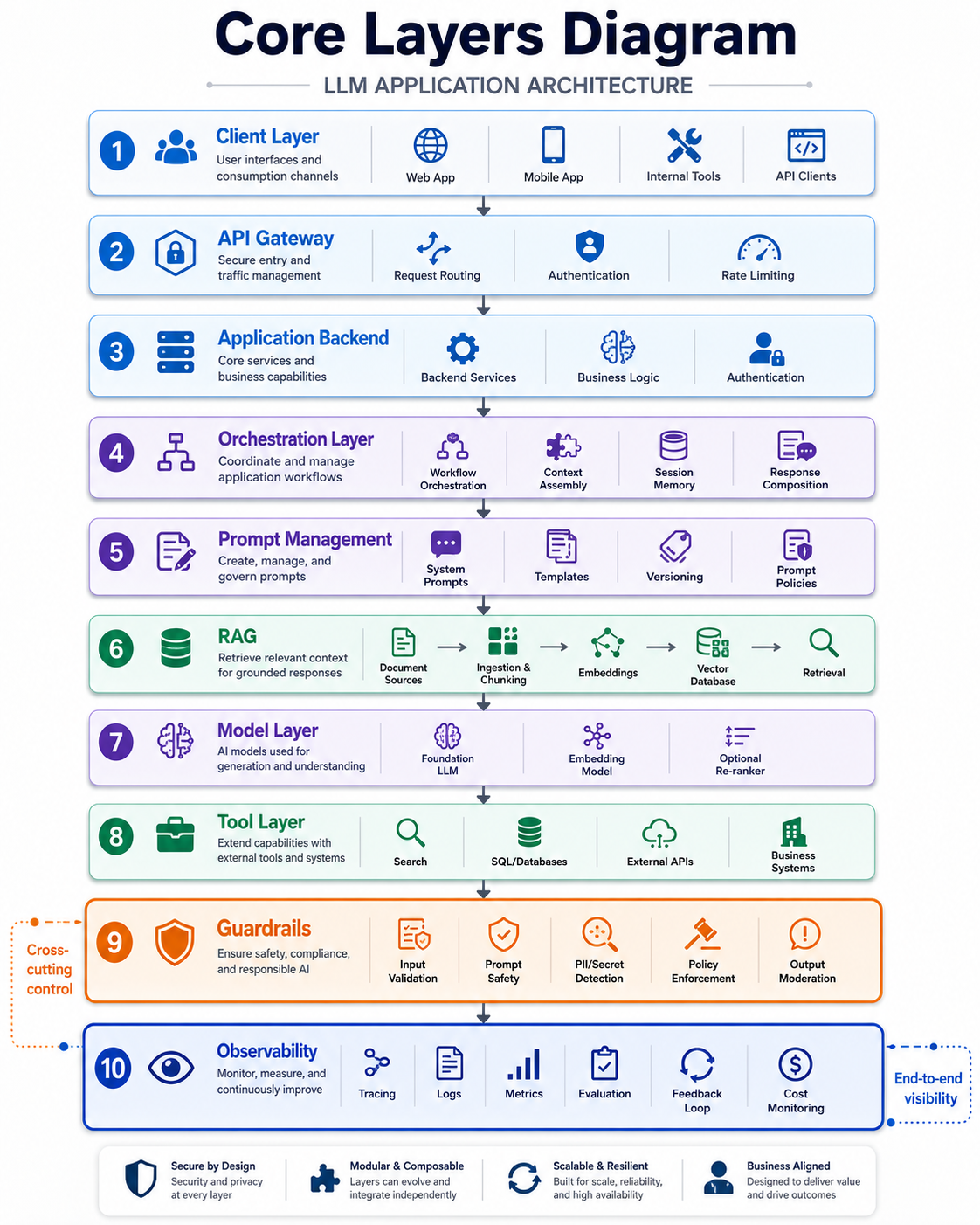
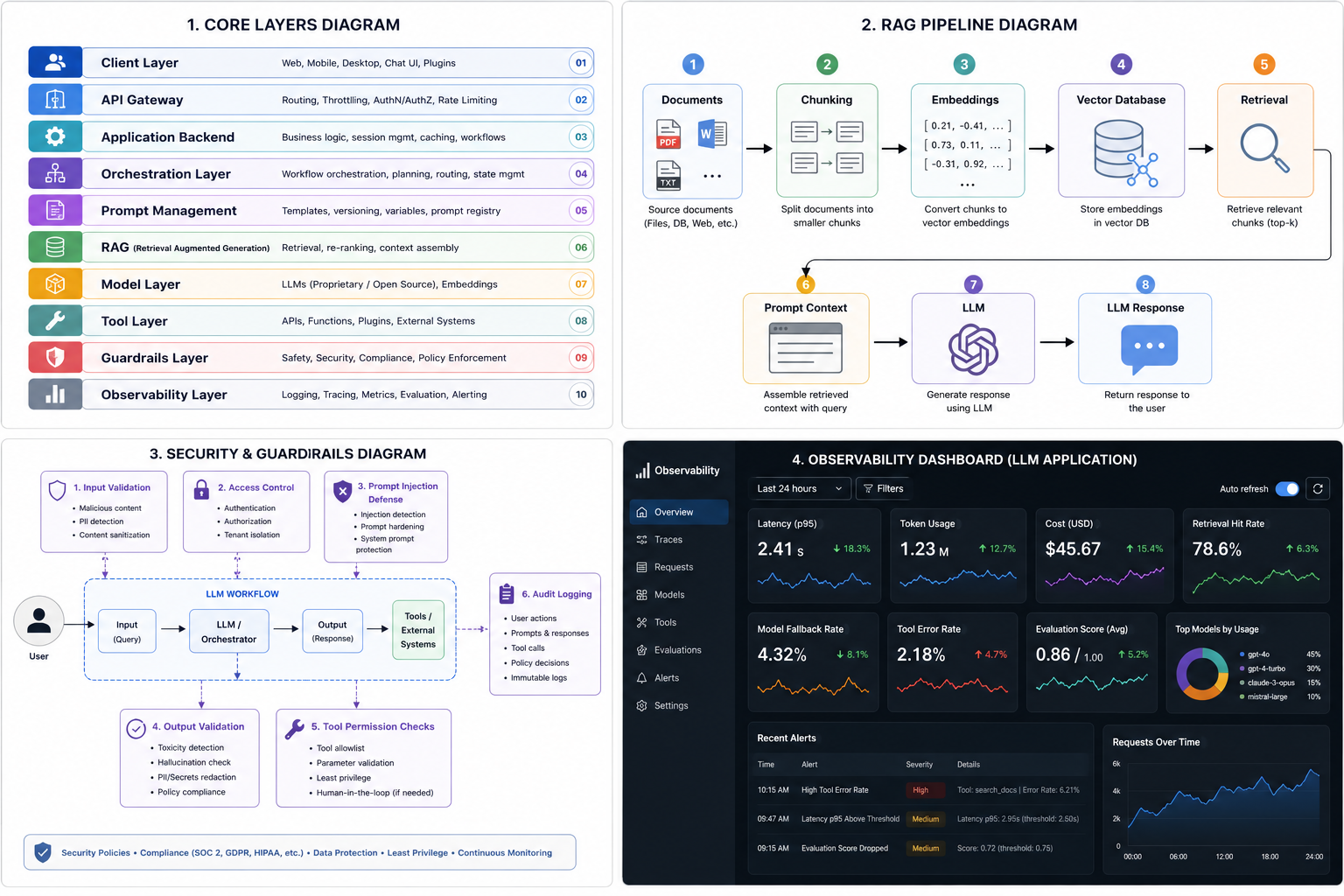
A production-ready LLM application is built from multiple layers. Each layer has a clear responsibility, from accepting user input and routing requests to retrieving knowledge, orchestrating prompts, invoking tools, validating outputs, and observing system behavior.
Client and API layer
The client layer is where users interact with the system: web apps, mobile apps, chat interfaces, browser extensions, internal dashboards, or API consumers. It should collect input and present results, but sensitive operations should stay in the backend.
The API layer acts as the secure gateway. It authenticates users, enforces authorization policies, validates incoming requests, applies rate limits, and routes traffic to the correct backend services.
Orchestration and prompt management
The orchestration layer coordinates the AI workflow. It decides whether to retrieve context, classify intent, call a tool, select a model, generate a response, or run post-processing and validation before returning an answer.
Prompt management should be treated like application code. System prompts, task templates, variables, examples, and prompt versions should be centrally managed, tested, documented, and roll-back ready.
RAG and vector databases
Retrieval-Augmented Generation lets an application retrieve trusted information from knowledge bases, product documentation, PDFs, databases, websites, or enterprise systems before the LLM generates a response.
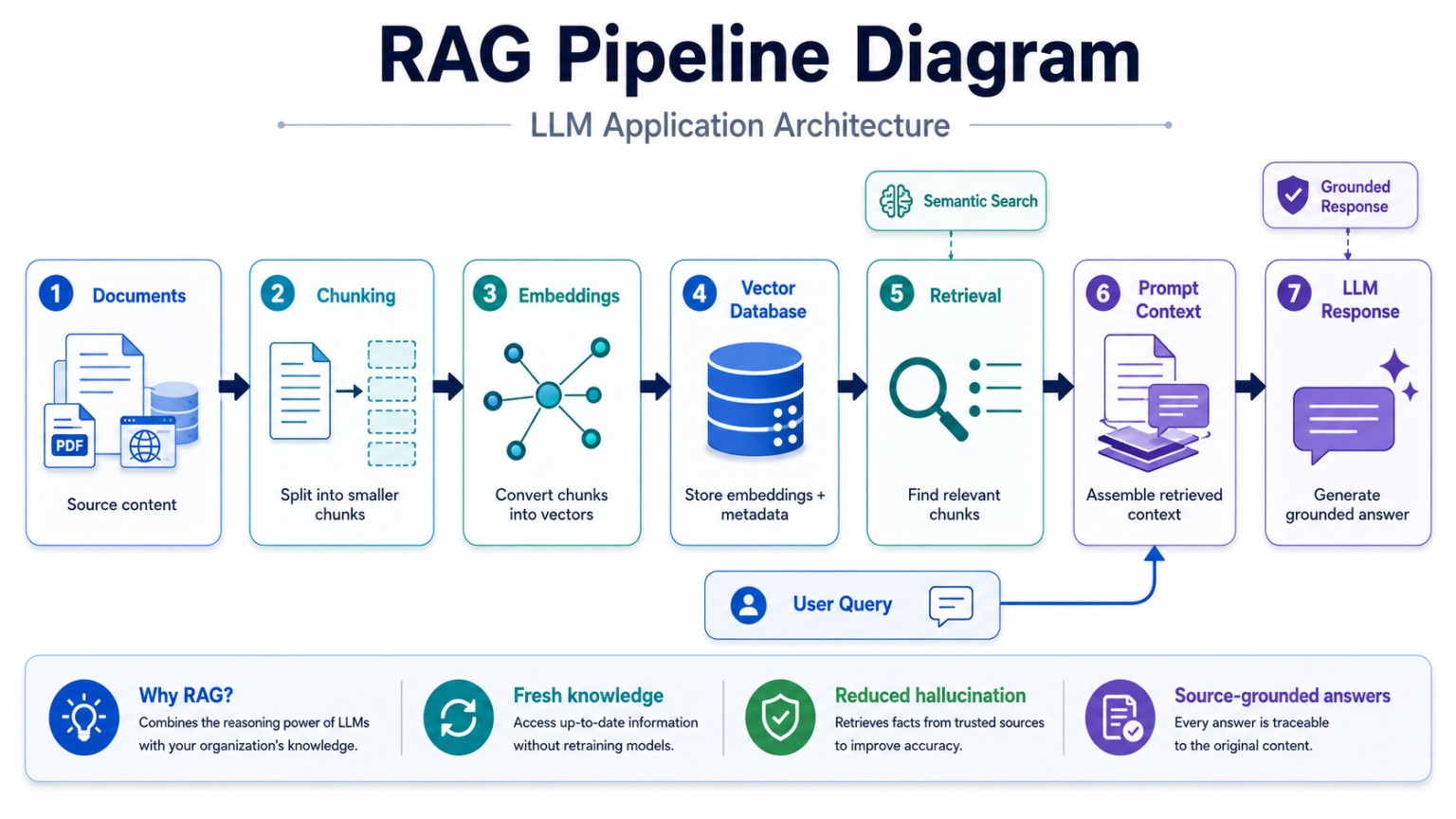
The vector database stores semantic embeddings and enables search by meaning rather than exact keyword matches. The retrieved chunks are then included in the prompt so the model can generate answers grounded in current and domain-specific information.
Model access and tool integration
The model access layer manages communication with hosted APIs or self-hosted models, including authentication, request formatting, retries, timeout handling, response parsing, and error management.
Tool integration lets the application query databases, call APIs, search documents, create tickets, perform calculations, and execute approved workflows. Because tool calls can affect real systems, they need permission checks, input validation, least-privilege access, and audit logging.
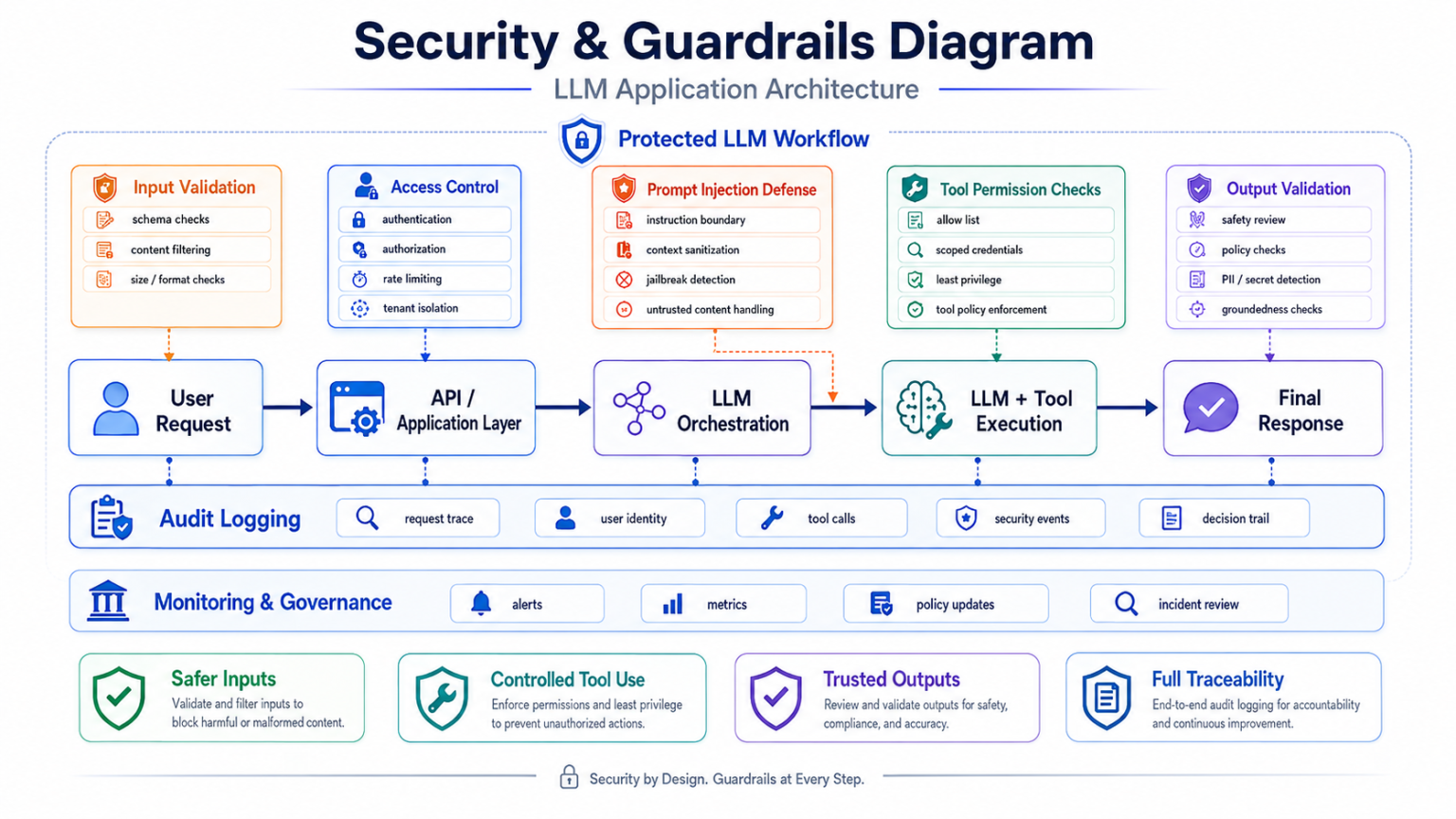
Guardrails and output validation
Guardrails inspect user input, defend against prompt injection, restrict unsafe operations, detect sensitive data, enforce policy boundaries, and validate generated responses before they reach the user or downstream systems.
Evaluation, observability, and cost control
Evaluation measures whether the system produces accurate and useful responses. Offline tests compare prompts, retrieval behavior, and model changes before deployment. Online evaluation tracks user feedback, success rates, latency, failures, token consumption, and human review outcomes.
Observability captures prompts, retrieved context, model calls, tool invocations, validation results, latency, token usage, errors, and cost. Without this visibility, debugging multi-step AI workflows becomes slow and unreliable.
Reference architecture flow
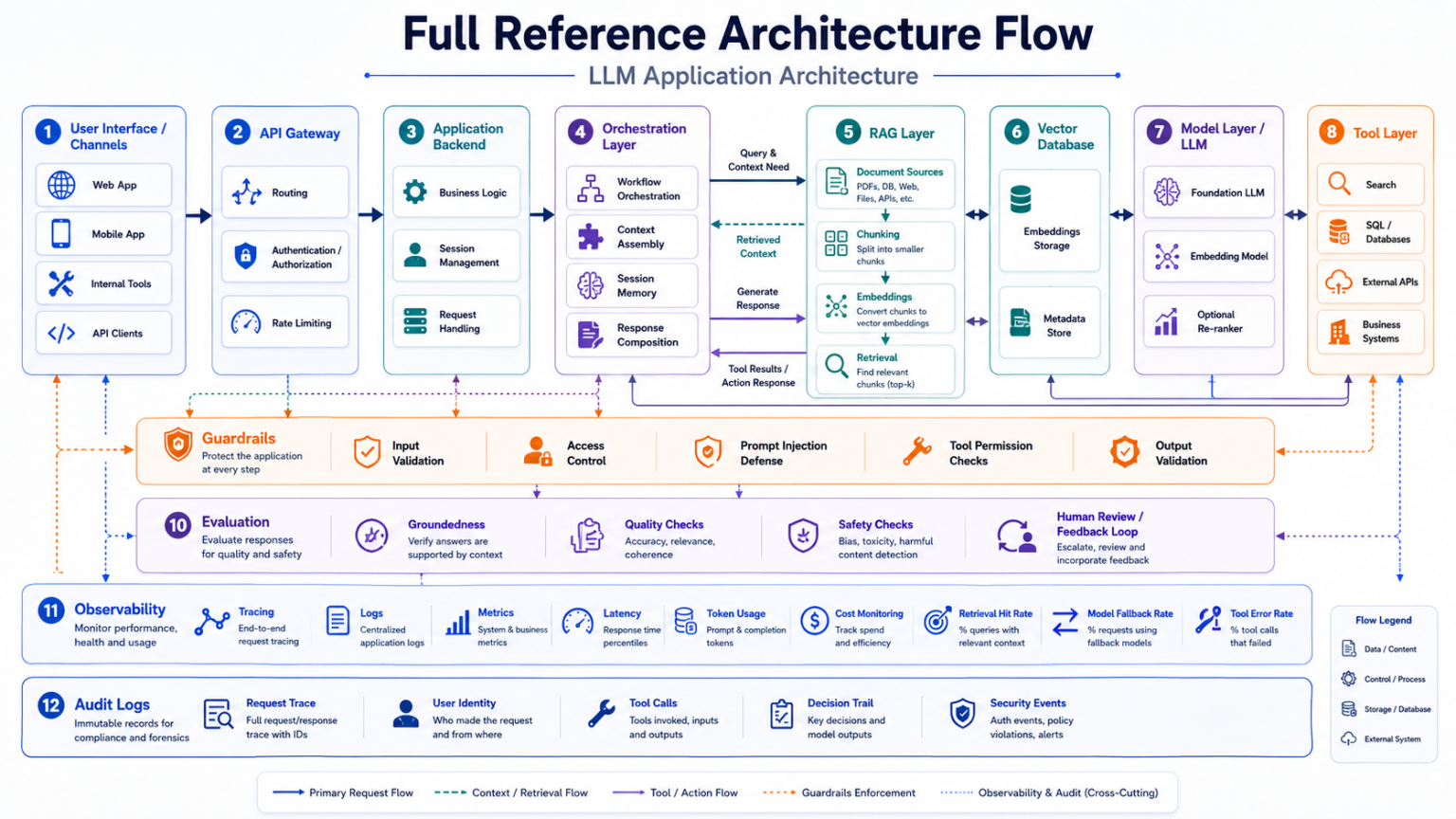
A complete request typically moves from user interface to API gateway, backend services, orchestration, prompt management, retrieval, vector database, model access, tool integration, guardrails, evaluation, observability, and audit logging.
Common mistakes to avoid
- Treating the LLM as the entire application instead of one service inside a larger system.
- Putting business rules, access control, or critical validation only inside prompts.
- Delaying evaluation until after deployment.
- Building a weak RAG pipeline with poor chunking, stale embeddings, or low-quality metadata.
- Shipping without end-to-end tracing, request logs, cost monitoring, and retrieval quality checks.
Best practices for production systems
- Define clear task boundaries and refusal rules.
- Separate client, API, backend, orchestration, retrieval, model, tool, guardrail, and observability responsibilities.
- Design RAG with data quality, metadata, source attribution, and re-indexing in mind.
- Build security into the architecture from the start.
- Make evaluation and monitoring continuous.
- Keep the architecture modular so providers, models, prompts, and retrieval engines can evolve.